



This ultimate guide breaks down how to select, structure, and optimize your audience strategy across Meta platforms. You will learn actionable frameworks for custom audiences, lookalikes, detailed demographic targeting, and AI-driven broad targeting. Implement these proven strategies to maximize your Return on Ad Spend (ROAS) and eliminate budget waste permanently.
Deciphering the Core Architecture of Meta Advertising Audiences
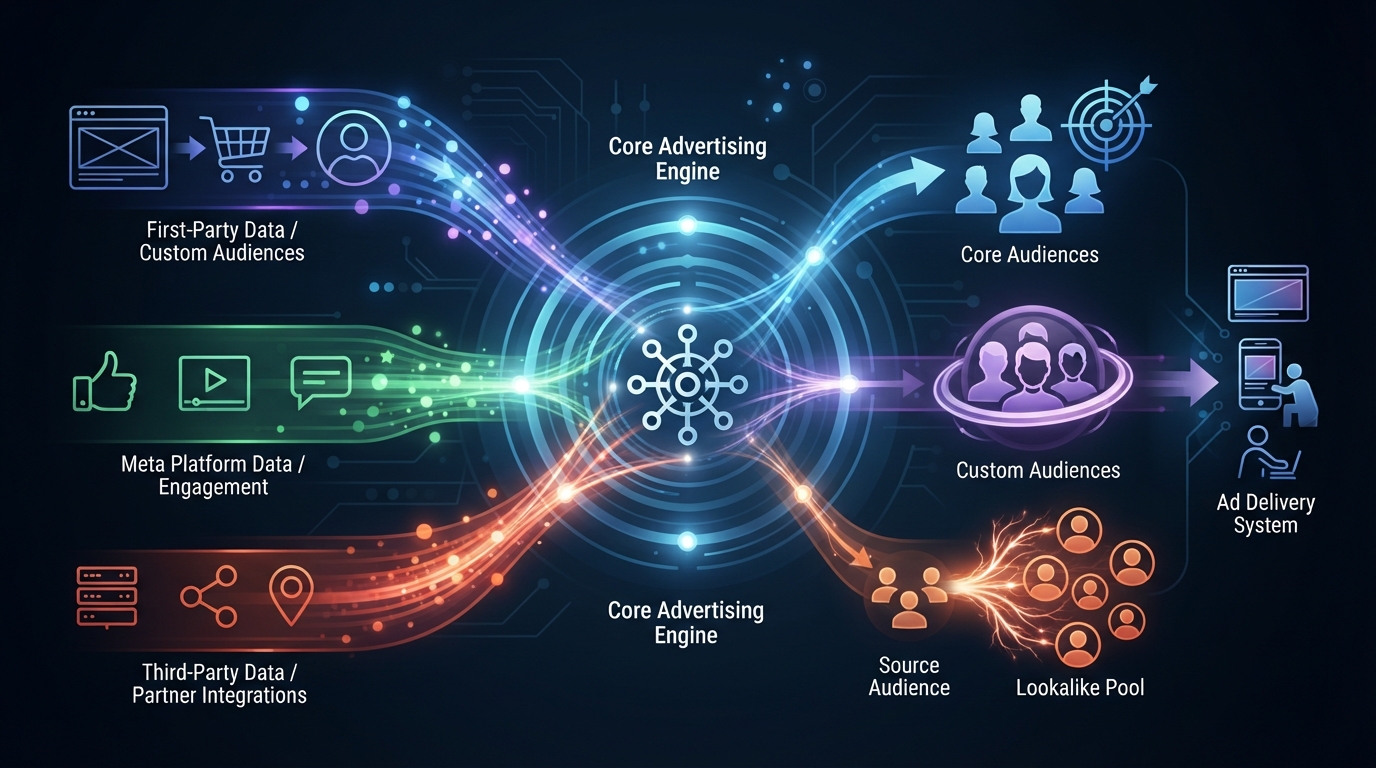

Mastering paid social advertising begins with a clear understanding of audience architecture. Meta operates one of the most sophisticated data-matching engines in the world, processing trillions of signals daily—including user engagements, browsing histories via Pixel, offline conversions, and cross-platform behaviors on Instagram, WhatsApp, and Facebook.
When you configure a 15 Facebook Ads target audience framework, you are organizing these vast data streams into specific, actionable segments that correspond directly to your conversion funnel.
To build a high-converting account structure, you must master the three foundational audience classifications provided inside Meta Ads Manager:
- Core Audiences: Based on location, demographics, interests, behaviors, and language. These are manually built using Meta’s native demographic data.
- Custom Audiences: Built from your first-party data (website traffic, customer lists, video views, catalog engagement). This forms the backbone of retargeting strategies.
- Lookalike Audiences (LALs): Created by Meta’s machine learning algorithm to find new users who share behavioral patterns and characteristics with your existing Custom Audiences.
The Mechanics of Signal Collection and Pixel Matching
Every target audience strategy relies heavily on signal strength. The Meta Pixel and Conversions API (CAPI) send server-side and browser-side event data back to Meta’s system. When a user views content, adds an item to a cart, or completes a purchase, Meta connects that action to a personal profile using hashed parameters like email addresses, phone numbers, IP addresses, and browser IDs.
When you build a 15 Facebook Ads target audience array, high signal quality ensures your ads reach real people with high purchase intent. Modern tracking requires implementing both Meta Pixel and CAPI simultaneously to overcome cookie deprecation and browser tracking restrictions.
For deeper technical breakdowns on tracking infrastructure, explore the Meta Business Help Center for official implementation standards.
Defining Your Ideal Customer Profile (ICP) Before System Setup
Before entering Ads Manager, you must define your Ideal Customer Profile (ICP). A common mistake among performance marketers is relying solely on native interest keywords without aligning them with real human psychology.
Define these essential dimensions for your brand:
- Demographic Blueprint: Age, biological sex, location clusters, household income brackets, education levels, and relationship statuses.
- Psychographic Profile: Core values, personal pain points, life aspirations, primary motivators, and daily struggles.
- Behavioral Footprint: Preferred media outlets, software tools, hardware usage, online shopping frequency, and preferred payment channels.
- Topical Boundaries: Direct competitors they buy from, industry influencers they follow, and publications they read.
Properly mapping these variables allows you to translate business goals into precise native targeting parameters inside Meta Ads Manager.
Broad Targeting and AI Algorithmic Matchmaking
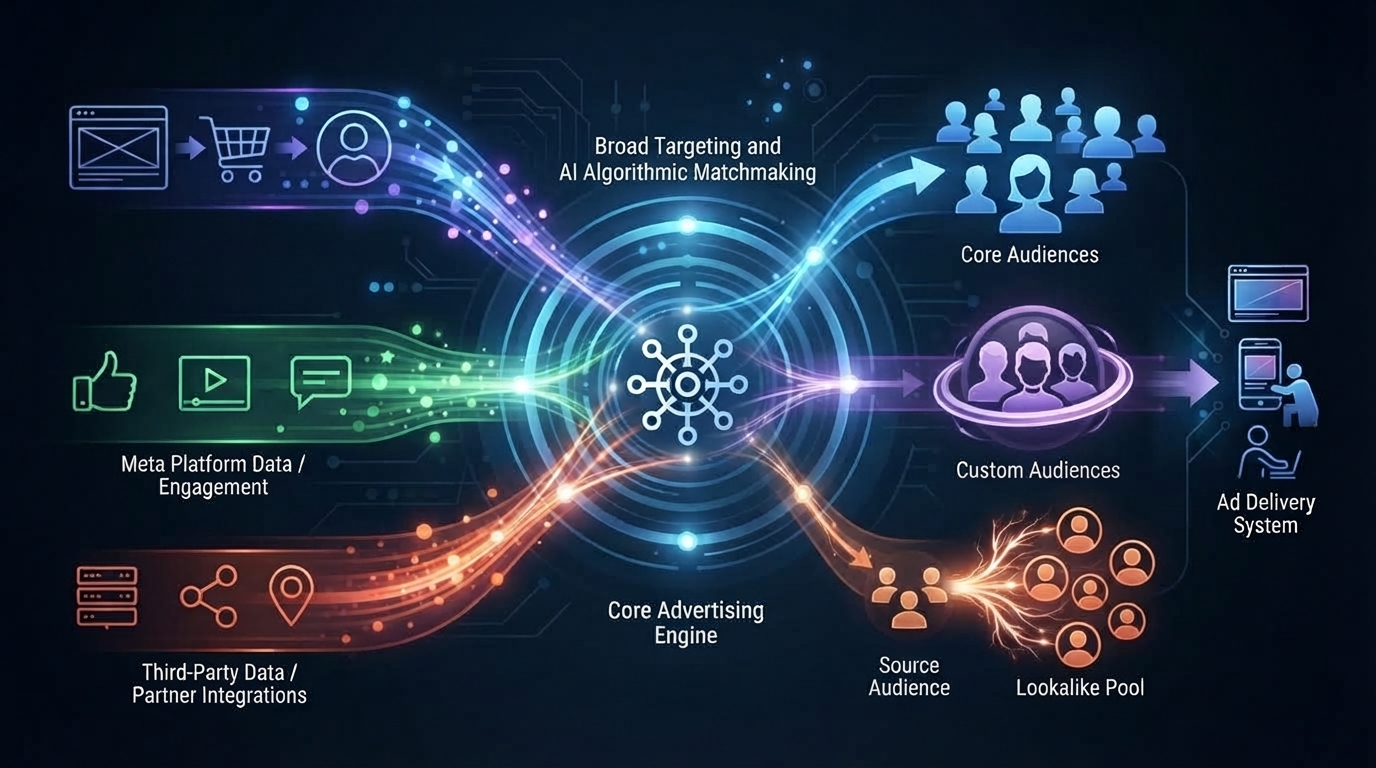
Broad targeting relies on minimal manual constraints, allowing Meta’s Advantage+ targeting engine to analyze ad copy, creative elements, and post-click conversions to find your ideal audience automatically.
Why Broad Targeting Works in Modern Advertising
Meta’s artificial intelligence has evolved beyond simple keyword matching. In past years, granular interest targeting was necessary to help the system locate potential buyers. Today, machine learning models analyze video captions, image assets, visual concepts, headline text, and landing page context to construct a dynamic audience persona for your ad set.
When running broad targeting, you remove all interest, behavioral, and lookalike filters. You specify only:
- Geographic Location (e.g., United States, United Kingdom, or specific metro zip codes)
- Age Range (e.g., 25–54)
- Gender (if product-specific)
By giving Meta’s algorithm complete freedom, you avoid audience saturation, reduce Cost Per Mille (CPM), and lower Cost Per Acquisition (CPA) over long-term campaigns.
The Dynamics of Creative-Led Audience Selection
Under a broad targeting model, your creative becomes your target audience.
If your ad video features a mother preparing organic baby food while speaking about infant digestion, Meta’s computer vision and automated audio transcription identify key themes instantly. The algorithm tests the ad against a small seed group of parents, observes engagement and conversion signals, and expands distribution to similar profiles across the network.
To optimize creative-led targeting:
- Use explicit hooks in the first 3 seconds (e.g., “If you suffer from chronic lower back pain…”).
- Highlight visual representations of your product solving a distinct problem for your ICP.
- Include bold text overlays featuring specific audience callouts.
- Avoid generic visuals that fail to signal to the AI engine who the ad is designed for.
High-Intent Lookalike Audiences Built on First-Party Data
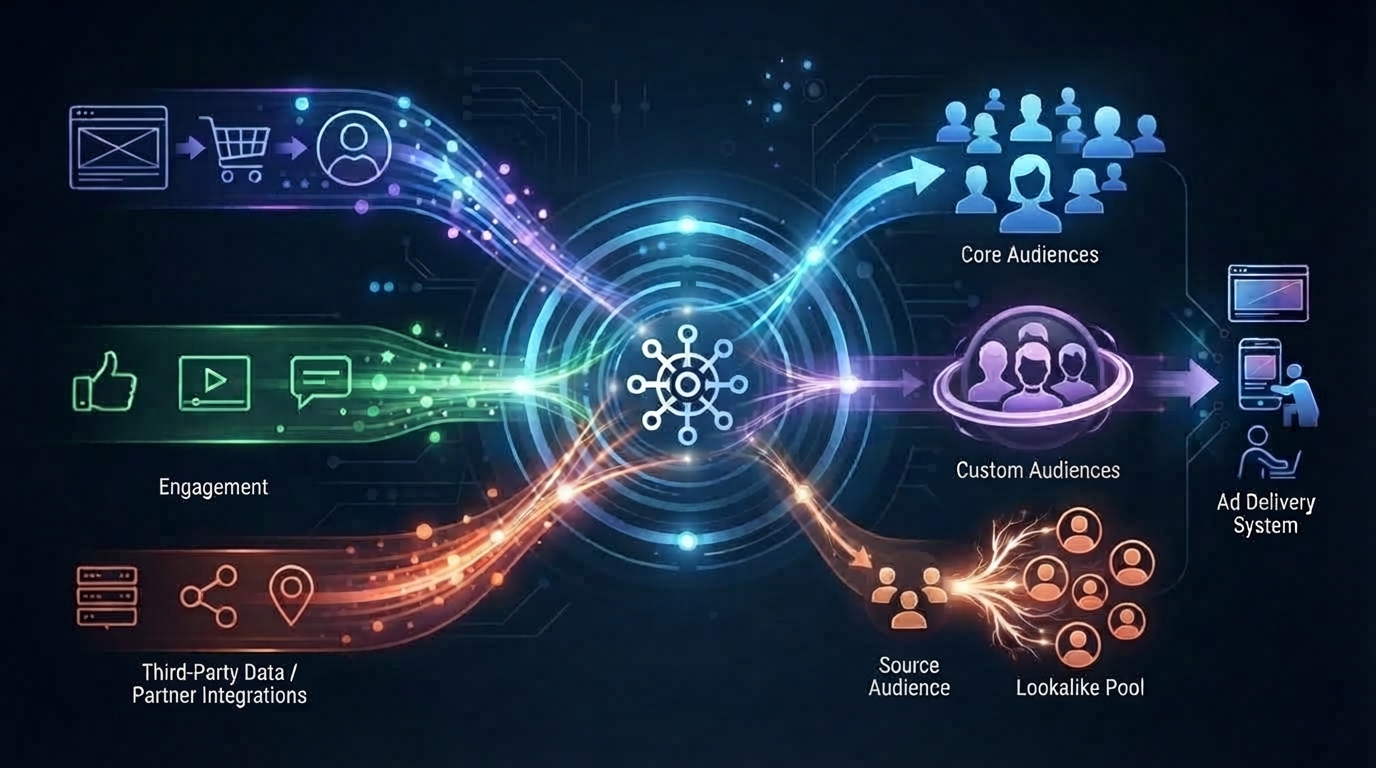
Lookalike Audiences allow marketers to reach new potential customers who resemble their highest-value existing buyers. However, the quality of a Lookalike Audience depends directly on the quality of its source data.
Source Data Hierarchy for Lookalike Models
Not all source lists produce equal results. Building lookalikes from low-intent actions like general website visits or page likes often dilutes conversion quality. Build your lookalike sources using this structured hierarchy:
| Lookalike Tier | Source Data Type | Value Signal | Optimal LAL Percentage |
| Tier 1 (Highest Quality) | LTV-Weighted Customer List | Highest (Actual Spend) | 1% – 2% |
| Tier 2 | Repeat Purchase / High AOV Customers | High (Frequency & Value) | 1% – 3% |
| Tier 3 | Completed Purchase (Pixel Event) | High (Conversion Realized) | 1% – 5% |
| Tier 4 | Initiate Checkout / Add to Cart | Medium (High Intent) | 2% – 5% |
| Tier 5 | High Time-on-Site / Video Views | Moderate (Engagement) | 3% – 10% |
Building LTV-Weighted Source Lists
To create a Lifetime Value (LTV) Lookalike:
- Export your customer database from your CRM or e-commerce platform (e.g., Shopify, HubSpot, Salesforce).
- Format your file to include columns for Email, Phone Number, First Name, Last Name, Country, and Value.
- Ensure the Value column reflects cumulative revenue generated by each individual customer over their entire lifetime.
- Upload the dataset directly into Meta Ads Manager under Audiences > Create Custom Audience > Customer List.
- Select Include LTV during upload, assigning the Value column as the primary weighting metric.
Meta assigns higher algorithmic importance to matching characteristics from your top 20% highest-spending customers, building a higher-performing lookalike audience as a result.
For more strategic details on growing customer revenue, check our guide on [customer retention strategies].
Multi-Layered Interest and Behavioral Stacking
While broad and lookalike targeting dominate modern campaign setups, interest and behavioral stacking remains essential for launching new products, targeting niche markets, or scaling competitive offers.
Avoiding Single-Interest Setup Traps
A common mistake is placing a single interest (such as “Yoga”) into an ad set with millions of users. This broad pool contains casual browsers, inactive profiles, and non-buyers. Conversely, creating 20 single-interest ad sets leads to severe audience overlap, internal bid competition, and quick budget exhaustion.
Instead, use Interest Stacking or Narrowing Logic (AND Condition) to isolate high-intent buyer cohorts.
Constructing an Interest Matrix with Logical Operators
To build a stacked interest target audience, combine related interests into structured thematic buckets using logical operators inside Ads Manager.
Example Scenario: Premium Specialty Coffee Roaster
Bucket A (Broader Topic): Interest MUST Match: Specialty Coffee OR Single-Origin Coffee OR Espresso
AND Narrow Audience (Bucket B – Specific Brands): Must ALSO Match: Blue Bottle Coffee OR La Marzocco OR Fellow Products
AND Narrow Audience (Bucket C – Purchasing Behavior): Must ALSO Match:
This triple-layered approach ensures your ads target dedicated coffee enthusiasts who actively purchase products online, eliminating waste on casual coffee drinkers.
To refine your broader digital strategy across paid channels, review our resource on [digital marketing performance metrics].
High-Intent Retargeting via Custom Audiences
Retargeting captures prospects who interacted with your brand but have not yet converted. A successful 15 Facebook Ads target audience deployment relies heavily on segmented retargeting pools matched with customized messaging.
Time-Decay Retargeting Framework
Treating a user who visited your site 2 hours ago the same as someone who visited 85 days ago leads to inefficient ad spend. Implement a Time-Decay Retargeting Structure to match ad copy urgency with user recency.
1. Ultra-Hot Audience (0–3 Days Post-Action)
- Inclusions: Website visitors, Add-to-Cart, Initiate Checkout within the last 72 hours.
- Exclusions: Purchased (Last 180 Days).
- Creative Strategy: Dynamic Product Ads (DPA), limited-time discount codes, or direct objection-handling copy.
2. Warm Intent Audience (4–14 Days Post-Action)
- Inclusions: Website visitors, product page views within 4–14 days.
- Exclusions: Add-to-Cart (Last 3 Days), Purchased (Last 180 Days).
- Creative Strategy: Customer reviews, video testimonials, unboxing clips, press quotes, and trust badges.
3. Moderate Consideration Audience (15–30 Days Post-Action)
- Inclusions: Content view, general landing page visits, high video watch time (75%+).
- Exclusions: Visited in last 14 days, Purchased (Last 180 Days).
- Creative Strategy: Educational content, comparison charts, brand origin stories, and free gift offers.
Platform-Native Engagement Audiences
Due to privacy-related tracking changes, website-based retargeting pools have grown smaller over time. Supplemental retargeting using Meta Platform-Native Engagement Data captures users within Meta’s ecosystem with 100% data accuracy:
- Video Engagement: Users who watched 50%, 75%, or 95% of your video ads in the last 90 days.
- Instagram Professional Account: Users who visited your profile, saved a post, or sent a Direct Message in the last 30 to 365 days.
- Lead Form Instant Experiences: Users who opened your Instant Lead Form but did not submit it.
- Facebook/Instagram Shop: Users who viewed products, added items to their shop cart, or saved items.
Combining native engagement pools with Pixel events builds a robust, leak-proof retargeting engine.
Strategy 5: Advanced Dynamic and Catalog-Based Audience Segmentation
For e-commerce brands managing hundreds of Stock Keeping Units (SKUs), manually selecting interest targets for every product is inefficient. Dynamic Product Ads (DPA) paired with Advantage+ Catalog Ads automate personalized targeting at scale.
Leveraging Advantage+ Catalog Audiences
When setting up catalog campaigns inside Meta Ads Manager, select Target ads to people who interacted with your products on and off Facebook. This unlocks dynamic behavioral segmentation:
- Viewed or Added to Cart But Did Not Purchase: Show the exact products users viewed or abandoned in their carts within a custom time window (e.g., last 7, 14, or 30 days).
- Upsell Products: Target users who added a specific product collection to their cart with a higher-tier product line.
- Cross-Sell Products: Target users who purchased from Category A (e.g., Running Shoes) with complementary items from Category B (e.g., Running Socks or Hydration Belts) within 30 to 60 days.
- Custom Combinations: Combine behaviors (e.g., viewed items from Category X, added items from Category Y, but excluded buyers from the past 90 days).
Dynamic Retargeting Exclusions and Retention Loops
A common mistake in dynamic catalog advertising is continuously showing ads for products a customer has already bought.
To maintain clean catalog campaigns:
- Always apply explicit exclusion filters (
Exclude: Purchase - Past 180 Days). - Create dedicated Customer Retention Campaigns designed specifically to cross-sell existing buyers based on expected product replenishment cycles (e.g., 30 days for skincare, 90 days for supplements).
Read more about scaling digital store operations in our comprehensive guide on [e-commerce marketing optimization].
Hyper-Local and Geofenced Targeting Frameworks
For brick-and-mortar stores, local service businesses, franchises, and regional event venues, nationwide targeting wastes budget. Hyper-local geographic targeting delivers relevant ads exclusively to consumers within driving distance.
Precision Radius and Location Options
Inside Ads Manager, fine-tune geographic parameters by selecting specific location criteria:
- People living in or recently in this location: Captures both permanent residents and active visitors.
- People living in this location: Reaches local residents while excluding transient travelers (ideal for recurring local services like dentist offices, gyms, or HVAC repairs).
- People recently in this location: Targets tourists and commuters (ideal for local attractions, restaurants, and entertainment venues).
Combining Location Pins with Demographic Exclusions
To maximize hyper-local efficiency:
- Drop Pin Feature: Place exact latitude/longitude pins over your physical store location and set a tight radius (e.g., 1 to 5 miles).
- Exclude Overlapping Zip Codes: Exclude low-income zip codes or areas outside your delivery zone.
- Layer Dayparting Rules: Run ads only during business operational hours or peak decision-making times (e.g., schedule restaurant ads between 10:30 AM and 2:00 PM for lunch specials).
Audience Overlap Management and Auction Overlap Prevention
When running multiple ad sets targeting similar audiences within the same account, your ad sets compete against each other in Meta’s auction. This leads to Auction Overlap, inflated CPMs, poor budget allocation, and erratic performance.
Detecting Overlap with Audience Overlap Tool
Meta provides a native diagnostic tool to evaluate audience redundancy:
- Navigate to Audiences in Meta Ads Manager.
- Select two or more saved, custom, or lookalike audiences.
- Click the Actions dropdown menu and select Show Audience Overlap.
If the overlap between two ad sets exceeds 20% to 30%, running them simultaneously causes your ad sets to bid against each other in the auction.
Strategies to Eliminate Overlap and Prevent Self-Bidding
To eliminate internal auction competition:
Consolidate Ad Sets: Merge overlapping interest ad sets into a single, unified ad set with higher combined budget.
Implement Explicit Mutual Exclusions:
- In your Broad / Interest Ad Set: Exclude all Custom Audiences (Lookalikes, Website Visitors, Past Buyers).
- In your Lookalike Ad Set: Exclude Website Visitors and Past Buyers.
- In your Retargeting Ad Set: Exclude Past Buyers (unless running a cross-sell campaign).
By establishing clear exclusion logic across every campaign tier, every dollar spent targets a distinct prospect without internal auction competition.
For additional insight into structuring campaign budgets, read our strategy guide on [media buying budget allocation].
Strategy 8: The 15 Facebook Ads Target Audience Blueprints (Detailed Frameworks)
To give you an actionable roadmap, here are 15 high-converting 15 Facebook Ads target audience blueprints mapped directly to specific funnel stages, business models, and campaign objectives.
1. The Completely Broad Advantage+ AI Audience
Funnel Stage: Top of Funnel (Prospecting)
- Targeting Setup: No interests, no lookalikes. Age: 18–65+, Gender: All, Location: Target Country.
- Best Used For: Scalable e-commerce brands, high-volume lead generation.
- Key Advantage: Lowest possible CPMs and maximum algorithmic flexibility.
2. The High-Value 1% Revenue LTV Lookalike
- Funnel Stage: Top of Funnel (Prospecting)
- Targeting Setup: 1% Lookalike built from top 20% highest lifetime-value buyers uploaded via CAPI/CRM.
- Best Used For: Premium brands, luxury goods, high-AOV subscription boxes.
- Key Advantage: Efficiently acquires customers with high willingness to spend.
3. The Stacked Niche Interest & Engaged Shopper Matrix
- Funnel Stage: Top of Funnel (Prospecting)
- Targeting Setup: [3–5 Related Niche Interests] AND [Must Match: Engaged Shoppers].
- Best Used For: New ad accounts lacking pixel data, niche physical products.
- Key Advantage: Filters out casual internet users, ensuring ads reach active online buyers.
4. The B2B Industry & Job Title Precision Layer
- Funnel Stage: Top of Funnel (Prospecting)
- Targeting Setup: Job Titles (e.g., Director of Marketing, Founder, CEO) AND Industry Keywords AND Business Software Interests (e.g., Salesforce, HubSpot).
- Best Used For: SaaS companies, B2B services, professional agencies.
- Key Advantage: Reaches key decision-makers on consumer-focused social platforms.
5. The Competitor Audience Takeover Segment
- Funnel Stage: Top of Funnel (Prospecting)
- Targeting Setup: Direct competitor brand names, major media outlets in your niche, and relevant industry publications stacked into an interest bucket.
- Best Used For: Challenger brands disrupting established market categories.
- Key Advantage: Intercepts warm prospects who already understand your product category.
6. The Deep Video Engager Pool (75%+ Watch Time)
- Funnel Stage: Middle of Funnel (Consideration)
- Targeting Setup: Custom Audience of users who watched 75% or 95% of top-of-funnel video ads within 30 to 60 days.
- Best Used For: High-ticket products requiring user education and trust.
- Key Advantage: Retargets qualified prospects who demonstrated high visual engagement.
7. The Social Media Account Interaction Hub
- Funnel Stage: Middle of Funnel (Consideration)
- Targeting Setup: Custom Audience of anyone who interacted with your Instagram Business Account or Facebook Page within 30 days.
- Best Used For: Content-heavy brands, lifestyle products, influencer-led businesses.
- Key Advantage: Bridges the gap between organic social engagement and paid conversion.
8. The High-Intent Content & Blog Reader Cohort
- Funnel Stage: Middle of Funnel (Consideration)
- Targeting Setup: Website Custom Audience based on specific URL visits (e.g., blog articles, comparison pages, pricing calculators) with minimum spending time over 60 seconds.
- Best Used For: Inbound marketing campaigns, complex financial products, healthcare solutions.
- Key Advantage: Captures researchers actively evaluating solutions to their problems.
9. The Event & Lead Form Engagement Recycler
- Funnel Stage: Middle of Funnel (Consideration)
- Targeting Setup: Users who opened an Instant Lead Form or registered for a Meta Event but did not complete final submission.
- Best Used For: Real estate, webinars, auto dealerships, local service quotes.
- Key Advantage: Re-engages drop-offs who expressed initial interest in your offer.
10. The Local Radius Geofenced Prospecting Pool
- Funnel Stage: Top / Middle of Funnel
- Targeting Setup: Drop pin over physical locations with 3-mile radius + demographic filters matching ideal local customer profile.
- Best Used For: Physical retail, gyms, dental clinics, local restaurants.
- Key Advantage: Eliminates out-of-market ad spend while dominating local geographic zones.
11. The Abandoned Cart & Checkout Rescue Team (0–3 Days)
- Funnel Stage: Bottom of Funnel (Conversion)
- Targeting Setup: Custom Audience: Add to Cart OR Initiate Checkout (Last 3 Days) EXCLUDE Purchases (Last 180 Days).
- Best Used For: E-commerce, digital downloads, online ticket sales.
- Key Advantage: High-converting retargeting window with immediate buying intent.
12. Dynamic Catalog Retargeting (Viewed but Unpurchased)
- Funnel Stage: Bottom of Funnel (Conversion)
- Targeting Setup: Advantage+ Catalog Ads targeting users who viewed or added products to cart in the last 7–14 days without buying.
- Best Used For: Multi-SKU retailers, apparel brands, marketplace sellers.
- Key Advantage: Delivers personalized dynamic ad creative featuring exact items viewed.
13. The Time-Decay Multi-Step Web Visitor Retargeting
- Funnel Stage: Bottom of Funnel (Conversion)
- Targeting Setup: Website visitors (14–30 Days) EXCLUDE Visitors (0–13 Days) and EXCLUDE Buyers.
- Best Used For: Re-engaging warm leads before intent fades completely.
- Key Advantage: Matches ad copy urgency with exact stages of customer decay.
14. The Existing Buyer Cross-Sell & Upsell Loyalty Engine
- Funnel Stage: Post-Purchase / Retention
- Targeting Setup: Custom Audience: Buyers (Past 30–90 Days) EXCLUDE Recent Buyers (Past 0–7 Days).
- Best Used For: Consumable products, SaaS upgrades, seasonal collections.
- Key Advantage: Delivers high return on ad spend by targeting existing buyers.
15. The Win-Back At-Risk Inactive Customer Vault
- Funnel Stage: Retention / Win-Back
- Targeting Setup: Upload CRM list of customers who haven’t purchased in 180–365 days EXCLUDE Active Buyers (Past 90 Days).
- Best Used For: Annual subscription renewals, re-engaging churned customers.
- Key Advantage: Re-activates dormant customer records cheaper than cold acquisition.
To analyze how these funnel segments impact your broader customer acquisition costs, explore our breakdown on [paid media metrics tracking].
Common Mistakes to Avoid When Selecting Your Facebook Target Audience
Even experienced performance marketers ruin promising campaigns by making preventable targeting mistakes inside Meta Ads Manager.
1. Hyper-Segmentation and Micro-Targeting
Creating ad sets with small audience sizes (under 50,000 users) restricts Meta’s machine learning engine. When an ad set cannot secure at least 50 optimization events per week (the learning phase threshold), CPMs skyrocket and performance degrades rapidly.
2. Forgetting Explicit Exclusions
Failing to exclude existing buyers from prospecting campaigns leads to wasted ad spend. Always double-check that cold outreach ad sets exclude all Custom Audiences of recent buyers, email subscribers, and active leads.
3. Ignoring Audience Fatigue and Frequency Spikes
When ad frequency (the average number of times a user sees your ad) exceeds 3.0 to 4.0 within a 7-day period on cold audiences, performance drops. Monitor metrics closely: rising Frequency alongside falling Click-Through-Rate (CTR) and rising CPA signals audience fatigue. Refresh creative assets or expand audience sizing immediately.
4. Combining Unrelated Interests into One Pool
Mixing unrelated interests (e.g., Golf, Real Estate Investing, and Organic Gardening) into a single ad set makes it impossible to identify which theme drives conversions. Group related terms logically into clear thematic buckets.
5. Over-reliance on Native Interest Data Post-Privacy Changes
Relying entirely on native interest keywords without supporting first-party CAPI signals or broad creative-led targeting exposes campaigns to data loss. Build long-term resilience on dynamic broad and lookalike frameworks supported by solid first-party data collection.
For additional compliance guidelines, refer directly to official policies found within the Meta Advertising Standards.
Step-by-Step Execution Checklist for Targeting Setup
Follow this step-by-step checklist whenever building a new audience inside Meta Ads Manager:
- Verify Signal Integrity: Ensure Meta Pixel and Conversions API (CAPI) are active with Event Quality Scores above 7.0/10.
- Select Clear Funnel Tier: Assign the ad set to Top of Funnel (Cold), Middle of Funnel (Warm), or Bottom of Funnel (Hot).
- Establish Logical Exclusions: Exclude recent buyers, active lead submissions, and existing lower-funnel audiences.
Evaluate Audience Size: Confirm potential reach falls within recommended ranges:
- Cold / Broad Audiences: 2,000,000 to 10,000,000+ potential reach.
- Lookalike Audiences: 1% to 5% of target country population.
- Retargeting Pools: Minimum 1,000 active profiles for stable auction bidding.
Conclusion
Mastering how to build and select a 15 Facebook Ads target audience framework turns random advertising efforts into a predictable growth engine. By aligning first-party data, algorithmic broad targeting, lookalike modeling, and structured retargeting loops, you can scale revenue while keeping acquisition costs under control. Continually test your assumptions, eliminate audience overlap, and let first-party data guide your campaign strategy. Ready to optimize your campaign performance? Audit your existing ad sets against these 15 audience blueprints today and eliminate wasted ad spend.
Frequently Asked Questions (FAQs)
1. How do you select the target audience for Facebook Ads when launching a brand-new ad account?
When launching a brand-new account without historical pixel data, begin with a two-pronged strategy. Combine Stacked Niche Interest Audiences (targeting verified competitor brands, trade publications, and specific industry tools) alongside a Completely Broad Advantage+ AI Audience. Use explicit problem-aware ad creative to help Meta’s algorithm locate your ideal buyers, while building custom audience pools for future retargeting.
2. What is the optimal audience size for cold prospecting on Facebook?
For cold prospecting campaigns in major markets like the US or UK, the ideal audience size ranges from 2,000,000 to 10,000,000+ users. Broad targeting pools allow Meta’s machine learning engine to find high-intent buyers without forcing your ad set into premature saturation or high CPM costs.
3. How often should customer lists be updated for Lookalike Audiences?
Customer lists used for Lookalike Audiences should be updated at least once every 30 days. For high-volume e-commerce stores, integrating your CRM directly with Meta via Conversions API ensures real-time customer list synchronization, keeping lookalike seed pools dynamically updated.
4. Should I enable Advantage Detailed Targeting on all my ad sets?
Enable Advantage Detailed Targeting when scaling budgets or when ad sets enter the learning limit phase. However, disable it during precise interest-validation testing so you can evaluate specific interest keywords without algorithmic expansion.
5. What is the best way to avoid audience overlap between ad sets?
To avoid audience overlap, establish strict mutual exclusions across your campaign setup. Exclude past buyers and warm retargeting audiences from cold prospecting ad sets. Before launching new ad sets, use Meta’s native Audience Overlap Tool to ensure overlap between active ad sets remains below 20%.
6. How do I retarget users effectively after recent privacy updates?
Retarget effectively by shifting focus toward Meta Platform-Native Engagement Audiences, such as video viewers (75%+ watch time), Instagram account engagers, Facebook Shop visitors, and Instant Lead Form openers. These actions occur within Meta’s ecosystem and maintain 100% data tracking accuracy.
7. What is the difference between a 1% Lookalike and a 5% Lookalike Audience?
A 1% Lookalike Audience contains the top 1% of users in your target country who most closely match your seed source list, making it the most targeted, high-intent lookalike available. A 5% Lookalike Audience expands reach to a broader group, introducing more variance but offering larger scale for prospecting.
8. How long should a retargeting window be for abandoned cart visitors?
The highest-converting retargeting window for abandoned carts is 0 to 3 days. High-intent users are most likely to complete their purchase immediately following abandonment. Set up secondary time-decay windows (4–14 days and 15–30 days) featuring social proof, testimonials, and FAQs to capture lingering prospects.
9. Why is my broad targeting ad set outperforming my detailed interest ad set?
Broad targeting frequently outperforms interest ad sets because it gives Meta’s AI algorithm complete freedom to bid across the entire user base based on real-time visual, contextual, and conversion signals. Broad targeting benefits from lower baseline CPMs, reduced internal auction friction, and minimal audience saturation.
10. How do I know if an audience is experiencing ad fatigue?
Audience fatigue is indicated by a rising 7-day Frequency metric (above 3.0–4.0) occurring alongside a declining Click-Through Rate (CTR) and a rising Cost Per Acquisition (CPA). When fatigue sets in, refresh your creative assets, alter your ad hooks, or expand your targeting parameters to reach fresh users.